
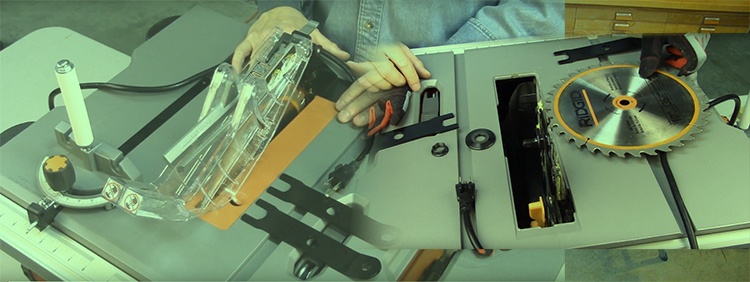
To change a RIDGID table saw blade, first identify the model and follow its blade-replacement instructions with power disconnected. Use the specified wrenches or locking arrangement, preserve the correct arbor-hardware order, and restore the required protective equipment before operating the saw.
RIDGID table saws do not all use one interchangeable procedure. This guide helps you organize the job and avoid common selection mistakes. The R4510/R45101 example below is explicitly for those models; it is not a substitute for the R4512, R4518 or another saw’s manual.
Find your model’s blade-replacement section first
Read the model number from the saw’s identification label, then locate its operator’s manual. Check that the model and illustrations match your machine before collecting the replacement blade and tools.
If the arbor hardware, wrench arrangement or guard system differs from the instructions you have, stop and obtain the correct information. Do not force a nut or improvise a blade lock to make another model’s procedure fit.
1. Check the blade specification before opening the saw
Record the permitted diameter, arbor fit, speed rating and blade-type restrictions from the exact manual. Also check the blade-body and kerf requirements associated with the installed riving knife. Tooth count or a coating name alone cannot establish compatibility.
Choose the tooth design around the intended material and cut after those requirements are satisfied. A thinner blade is not automatically better, and a blade called a combination blade is not defined simply by having a 10-inch diameter. Do not assume a dado stack is approved because the machine is a table saw.
2. Prepare an isolated, clear workspace
Switch the saw off, wait for complete standstill and disconnect its power source before blade service. Keep the plug or other isolation arrangement under your control. Clear stock, offcuts and loose accessories from the table so you have room to work without reaching around obstacles.
Collect the specified blade-changing tools and a place to retain the removed hardware. Handle sharp teeth carefully and let a recently used blade cool. Protection for handling a stationary blade is a separate question from clothing and equipment permitted while the saw is running; do not carry a generic gloves recommendation into powered operation.
3. Open access using the model’s sequence
Use the manual’s order for blade height, throat-plate removal and any guard or pawl removal needed for access. These details matter because different machines provide different access and locking systems. Keep the removed components together for correct reassembly.
Before loosening anything, identify the arbor shaft, nut, washer or flange and the specified holding points in the diagram. Take a reference photograph for your own assembly if useful, while recognizing that a previously incorrect setup should not be copied. Resolve any mismatch with the manufacturer’s parts information.
4. R4510/R45101 example: use the correct wrench arrangement
The R4510/R45101 operator’s manual describes holding the arbor flats with one blade wrench while the other engages the nut. It identifies right-hand arbor threads. Its installation instructions place the blade teeth downward toward the front, specify the washer orientation and warn against overtightening.
This is an example of why the drawing and viewpoint matter. “Pull the wrench forward” without identifying which wrench and which side of the saw is ambiguous. Follow the actual manual sequence and figures for your model; do not transfer this example to a different RIDGID saw.
5. Inspect the parts before fitting the replacement
With power still isolated, examine the removed blade and accessible mounting components. A replacement blade should not be used to conceal a damaged washer, questionable arbor or unexplained wobble. Use the maker’s cleaning and inspection instructions, and obtain service for damage you cannot assess.
Do not automatically oil the arbor, blade-clamping faces or nut whenever you change a blade. Lubrication instructions for another part of the machine do not establish what belongs on a blade-mounting surface. Keep the hardware and mating surfaces in the condition specified by the saw manufacturer.
6. Reassemble and restore the cutting setup
Fit the compatible blade and hardware in the specified orientation, using the prescribed tightening method. Do not invent a torque figure or use an impact wrench unless the manufacturer specifically calls for it. Remove all service tools before any powered check.
Restore the throat plate and the protective equipment required for the intended operation. Check riving-knife compatibility and alignment using the model instructions. A blade that fits on the arbor may still conflict with the riving knife, insert or guard. Follow the stated clearance and free-movement checks before reconnecting power.
7. Check operation before using project stock
Complete the manual’s post-service checks and arrange a clear operating area with the required guards and protective equipment. If there is contact, wobble, abnormal sound or another unexplained change, stop and isolate power before inspection. Do not make a test cut to see whether a mounting problem goes away under load.
Once the saw passes its checks, use suitable scrap for any required setup verification. A different blade can change kerf allowance and the measured cut reference. Recheck the relevant settings before cutting finished parts rather than relying on the old blade’s fence or stop position.
When to obtain parts or service
Stop if the correct wrench is missing, the nut is seized, threads appear damaged or the documented parts do not match what is installed. Use model-specific replacement information instead of substituting a nearby washer or wedging an improvised object into the cutting system.
Keep the model number, blade specification and description of the problem available when contacting support. For an older or secondhand saw, confirm the installed riving knife and throat plate are also appropriate. Resolving that mismatch is part of the blade change, not a reason to operate without required protection.
Questions readers ask
Which way does a RIDGID arbor nut loosen?
Use the direction and viewpoint in your exact model’s manual. The R4510/R45101 manual specifies right-hand threads; this article does not assume that example covers every RIDGID saw.
Are thin-kerf blades always the best choice?
No. Blade-body thickness, kerf and riving-knife requirements must be compatible before comparing cut quality or cutting load.
Should I lubricate the arbor at every blade change?
Do not use that as a blanket rule. Follow the saw’s specific cleaning and lubrication instructions for each component.
Can every RIDGID table saw use dado blades?
No general permission follows from the brand name. Confirm model-specific approval, dimensions, hardware and insert requirements before considering that separate setup.
Complete the change with the correct manual beside you
Identify the model, verify the blade, isolate power and follow the exact removal and reassembly sequence. Finish with the required guards, alignment and clearance checks. A blade change is complete when the whole cutting setup is ready for its intended operation.
Sources and editorial approach
This guide was refreshed in October 2026 using primary sources and original practical analysis. It does not claim hands-on equipment tests. The exact tool and accessory instructions govern their operation.
RIDGID: R4512 manual download page